I spent a long time looking for a way to organize notes. I tried Zettelkasten, PARA, Bullet Journal, and ACE one by one. Each was clearly useful. But when I adopted one as-is, some part of it did not fit my life.
Several times, I found myself spending more time fixing the system than writing notes. I split folders again, merged tags, added properties, then removed them. The structure grew more sophisticated, but deciding where a new note belonged remained difficult.
Instead of searching for one more person’s method, I eventually turned the judgments I actually repeat into rules. I named the system You-Know Management, or YKM. It is also a small pun on reading Yoonho as “you know.”
YKM is not a method for accumulating more of what I know. It is a way to manage how I came to know something, while preventing the record from that time and my present interpretation from overwriting each other.
Link on this blog How I Found a Note System That Fits My Lifecycle (Korean)The earlier Korean post that led to YKM.Why I do not put everything in one place
What I want to preserve in my notes is not the amount of information, but the boundaries of change.
- What actually happened at that time?
- What did I encounter in the outside world then?
- How do I understand it now?
- What meaningful relationships connect it to other thoughts?
Put all four in one file and the boundaries soon blur. Sentences summarizing external material mix with my interpretation. I rewrite a past judgment to match my current conclusion. Later, I have to separate the source from my own thinking all over again.
YKM therefore divides the roles of memory.
| Tool | What it preserves | Default behavior |
|---|---|---|
sources/ | A capture of encountering the outside world at a particular time | Preserve the original material and its provenance |
log/ | What happened at a particular time and the judgment I made then | Accumulate records without overwriting the past |
notes/ | Current understanding, interpretation, and principles | Keep revising as evidence and counterexamples appear |
| wikilink | A meaningful relationship between a note and a subject | Reference it inside a sentence instead of copying it |
atlas/ | An order and set of questions for reading several notes | Explore through a path designed by a person |
Separating roles does not break connections. When each file’s responsibility is clear, changes are easier to see as I follow the links.
The time axis asks when I will revise again
The time of a note cannot be explained by its creation and modification dates alone. What matters to me is when attention returns to the note and when that cycle of revision ends.
I think of this in points, line segments, and rays.
| Shape | Attention and revision | Examples |
|---|---|---|
Point ({t₀}) | Writing and completion end within one interval of attention | Meeting minutes, a decision made at the time, an external-source capture |
Line segment ([t₀,t₁]) | Reopened several times, but with an end condition | An active project map, a research draft awaiting judgment |
Ray ([t₀,∞)) | No predetermined end; revised whenever new evidence appears | Principles, concepts, and maps of ongoing interests |
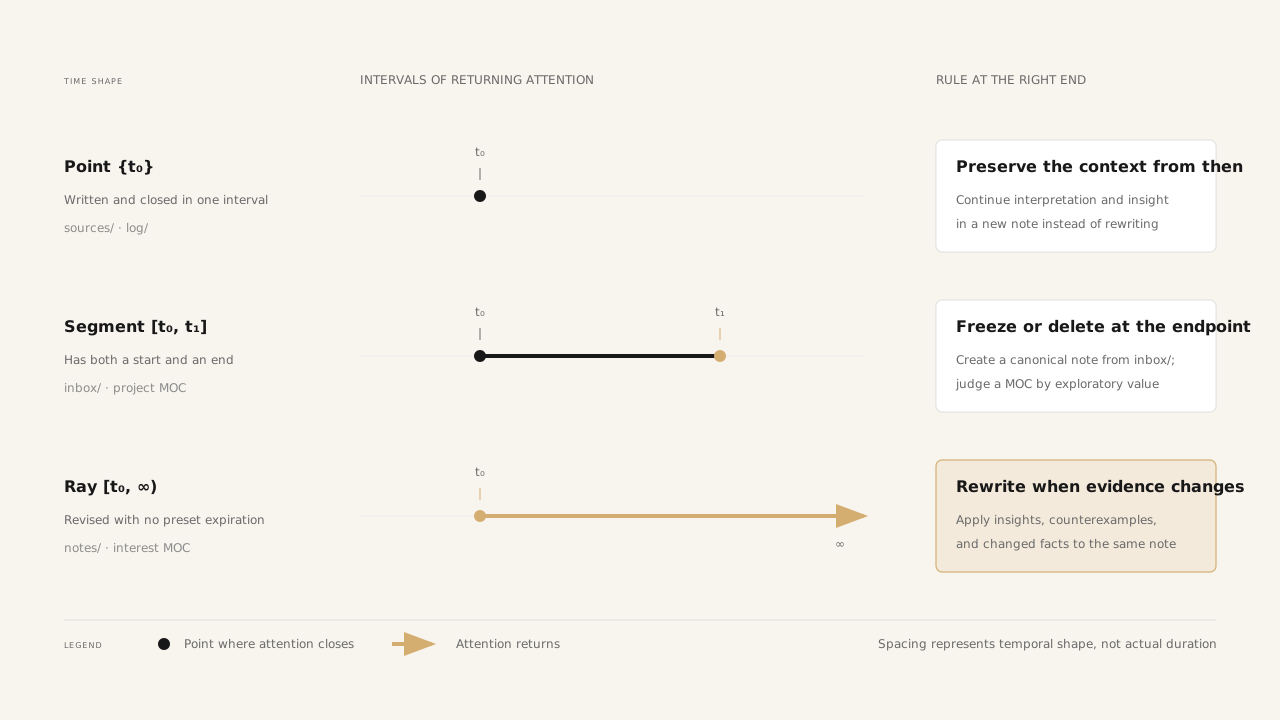
Even meeting minutes written over four hours are a point if I stop revising them after the meeting. Conversely, a short document is a segment if I reopen and revise it over several days before finishing. What matters is not the duration of writing, but whether attention returns in separate intervals and whether there is an end.
Bullet Journal operates the present in chronological order. PARA moves projects into Archive as time passes. ACE separates Atlas and Calendar to look at knowledge and time. YKM also assumes time changes the next action for a note, but focuses less on writing order or storage location and more on when to revise the same canonical note and when to close it.
I explore the time axis in more detail in How Long Should I Keep Revising a Note?.
The spatial axis decides how a file should be treated
One file can live in only one place, while one note may relate to several topics. A note can be about security, privacy, and architecture at the same time.
A topic-based folder forces me to choose one. Copies create the problem of deciding which file is canonical. In YKM, a folder does not describe the topic. It decides only how I should treat this file from now on.
| Location | Treatment |
|---|---|
inbox/ | A capture I have not judged yet; review it within 30 days |
sources/ | Original material created by someone else; do not rewrite the body |
log/ | An event and judgment from that time; do not overwrite it with a current conclusion |
notes/ | My interpretations, principles, and concepts that I will keep revising |
atlas/ | A place for creating reading paths, not storing ordinary notes |
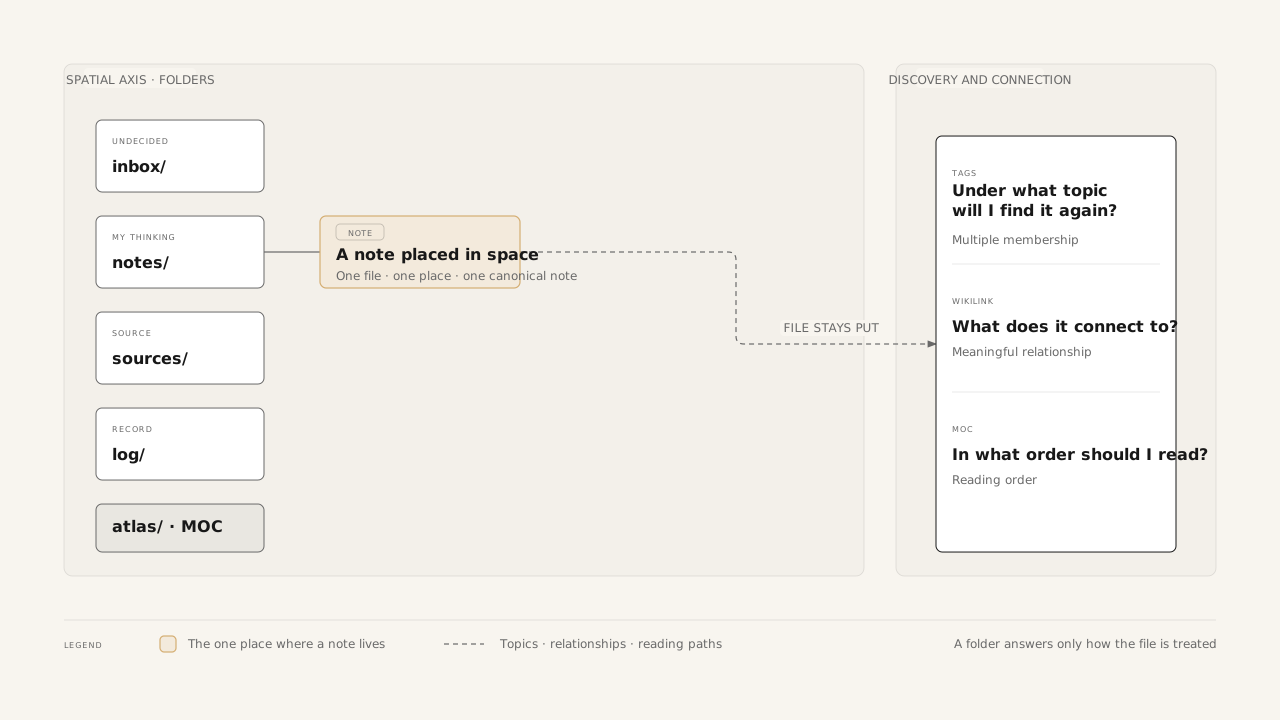
Before creating a note, I ask three questions rather than trying to guess its type.
- Have I not made a judgment yet? Put it in
inbox/. - Did it come from an external source? Preserve it in
sources/. - If I created it, will I keep revising it? Put it in
notes/if yes, andlog/if no.
I do not create context or project subfolders under log/. New records go directly under log/; filenames, the body, wikilinks, and MOCs carry the context.
And notes do not migrate. If a note takes on a different role, the original file has not transformed. A new note with a different responsibility has come into being.
- External material remains under
sources/, while my interpretation becomes a new note undernotes/. - A record from a project remains under
log/, while a reusable principle is extracted into a new note undernotes/. - An unreviewed AI draft stays in
inbox/, while material adopted by a person becomes a new canonical note in the appropriate place.
The two notes connect through a wikilink. If the old capture has no independent value, I delete it after checking its references. The role of each note stays stable from beginning to end instead of relying on file movement to carry meaning.
I explain how I arrived at the spatial axis in more detail in Where Should a Note Live?.
The tools divide the questions abandoned by folders
Simplifying folders was not enough. I also had to assign the questions they no longer answered to Properties, tags, wikilinks, and MOCs.
| Tool | Question it answers |
|---|---|
| Folder | How should this note be treated? |
| Properties | Which values should a machine sort and filter? |
| tags | Under which cross-cutting topics will I find it again? |
| wikilink | What is it connected to, and in what way? |
| Atlas MOC | In what order and from what perspective should I read? |
Keep Properties minimal
The four default Properties are created, tags, sources, and aliases. I always include created and tags, and add sources and aliases only when they have values. I allow state: archived only on a MOC that I no longer revise but retain as a path for exploration or retrospection.
I do not create values such as type, status, confidence, or updated. If the folder, filename, or body already tells me something—or if I never filter by the value—there is no reason to store it again. Instead of hiding low confidence behind confidence: low, I describe uncertainty under an Open questions section in the body.
Keep tags for cross-cutting topics
I use no more than three tags on a note, written in lowercase English kebab-case, with no hierarchy. Before adding one, I check three things.
- Will I retrieve at least three notes through this tag for the same reason?
- Is it a real topic rather than a note type, state, location, or project name?
- Is this note actually about the tag, rather than merely related to it?
People, organizations, products, technologies, and events are proper names, so I connect them with wikilinks instead of tags. Tags are good at gathering results under the same topic, but cannot say why the connection exists.
Let a wikilink state the relationship in a sentence
More links are not automatically better. I create one only when a sentence in the body can explain the relationship between two subjects.
Keeping sessions off the server makes [[statelessness-in-system-design|horizontal scaling]] easier.
This sentence shows how statelessness relates to horizontal scaling, rather than merely saying that both notes share a topic. I do not twist the current sentence to match the title of the linked note. I show the role it plays in the present context.
A MOC is a map, not an index
Tags and search show what exists, but not what to read first. When I start wandering through several notes to explore a topic, when a tag exceeds 30 notes, or when I want one path through project records and reusable knowledge, I create a MOC under atlas/.
A MOC shows the starting point, the current position, and where perspectives branch. Every link gets one line explaining why it belongs on that path. One note can appear in several MOCs because the file remains one while reading purposes differ.
I cover the distinction between Properties, tags, and wikilinks in Properties and Tags: Two Layers of Note Information, and the relationship between links and MOCs in Connecting Notes with Wikilinks and MOCs.
How I operate it in practice
The full YKM flow looks like this.
Capture → inbox/
          ↓ A person judges it. The file does not move.
External material → Create a new capture under sources/
Event or activity at the time → Create a new record under log/
Interpretation to keep developing → Create a new note under notes/
          ↖ Connect necessary relationships to the original capture, source, or log
When a project produces reusable value → Extract 1–3 new principles under notes/
When exploration becomes costly → Create a MOC under atlas/
Once a week, I spend about 15 minutes emptying inbox/. I reconsider whether captures older than a month are worth protecting and extract one or two reusable principles from finished projects. Once a quarter—not more often—I review low-frequency tags, synonyms, and large tags that may need a MOC.
I do not roll everything over automatically. The small amount of friction involved in rereading and choosing what remains acts as a filter. The purpose of the system is not to preserve everything, but to distinguish what can be reused from what should remain a historical record.
For a concrete example of dividing original material, historical records, and current interpretation, see Preserve Sources, Accumulate Records, Connect Thoughts.
It was ultimately about boundaries of responsibility
I once wanted a folder structure that could explain every note I might write in the future. I no longer think that structure is possible. Topics multiply, interests change, and I may draw a different conclusion when I read the same material again.
Instead, I keep each tool’s responsibility small. Folders handle treatment, Properties hold minimal structure, tags mark cross-cutting topics, wikilinks state meaningful relationships, and MOCs arrange reading order. sources/ protects someone else’s words, log/ preserves who I was at the time, and notes/ is where my current self keeps revising.
I do not think YKM is the answer for everyone. At least for me, though, creating a new note no longer takes as much hesitation. I now spend a little more time writing and rereading notes than fixing the system. For the moment, that is enough.
The RULES.md I give AI agents working with this vault
The block below restates only YKM’s operating rules in imperative form so it can be given directly to an AI agent. Adjust the vault path and validation command for the tool you use.
# RULES.md — You-Know Management (YKM)

This vault is a knowledge system designed to connect original material, historical records, and current interpretations without letting them overwrite one another.
Follow these rules before creating or editing files.

## 1. Responsibilities of each tool

- Folders express how a note should be treated.
- Properties contain only the minimum structure a machine needs.
- Tags express topics that cross multiple contexts.
- Wikilinks express meaningful relationships between subjects and thoughts inside sentences.
- An Atlas MOC guides the reading start, current position, and points where perspectives diverge.
- Do not record the same information through more than one tool.

## 2. Location of a new note

Ask these questions in order before creating a note.

1. Is it a capture that a person has not judged yet? Create it under `inbox/`.
2. Is it original material from an external source? Create it under `sources/` and do not rewrite the body at will.
3. If a person created it, will the writing continue to be revised?
   - Yes: create it under `notes/`.
   - No: create it under `log/` as a record from that time.

- Create only MOCs and entry points under `atlas/`.
- Store only images and attachments under `_attachments/`.
- Store only rules, templates, and validation tools under `_system/`.
- Do not create new top-level folders.
- Create new `log/` records directly under `log/`. Do not create context or project subfolders.
- Do not create a general-purpose `archive/` folder.

## 3. Notes do not migrate

- When a note's role changes, do not move or overwrite the existing file.
- Create a new note in the location appropriate to the new role and connect it to the previous note.
- Keep external material under `sources/`; write interpretation as a new note under `notes/`.
- Keep events from the time under `log/`; extract reusable principles into new notes under `notes/`.
- Before deleting an old capture, check its references and whether it has independent preservation value.
- Before deleting a file, repair the wikilinks that refer to it.

## 4. Revision over time

- Once an interval of attention closes, do not rewrite `sources/` or `log/` to match a current perspective.
- Create a new note when the same event happens again or external material changes.
- Keep updating the same canonical note under `notes/` when new evidence, counterexamples, or experience appears.
- After a project with an end condition finishes, freeze its MOC with `state: archived` only when it retains value for exploration or retrospection.
- If a note has no exploratory value, clean up its references and delete it.

## 5. Front matter

Every knowledge note uses YAML front matter.

```yaml
---
created: YYYY-MM-DD
tags: []
sources:
  - "https://example.com/"
aliases:
  - Another name
---
```

- `created` and `tags` are required.
- `tags` is always an array containing zero to three items.
- Add `sources` and `aliases` only when they have values. Do not leave empty arrays.
- Use `state: archived` only on an `atlas/` MOC that is no longer revised but remains as a path for exploration or retrospection.
- Do not create new properties such as `type`, `kind`, `status`, `reviewed`, `confidence`, `updated`, `title`, or `author`.
- Record unverified facts and low confidence under an `Open questions` section in the body, not in Properties.
- Record the next action in the body, not in a status property.

## 6. Tags

- Apply tags only to cross-cutting topics that the note actually discusses.
- Use no more than three tags per note.
- Use lowercase English kebab-case.
- Do not use hierarchical tags or `#hashtags` in the body.
- Create a new tag only when at least three notes will be retrieved for the same reason.
- Do not turn folder locations, note types, states, difficulty levels, or project names into tags.
- Connect proper names—people, organizations, products, technologies, and events—with wikilinks instead of tags.
- When a tag exceeds 30 notes, consider whether an Atlas MOC is needed before dividing the tag.

## 7. Wikilinks

- Link only meaningful relationships. There is no minimum number of links.
- Place links inside body sentences when possible and explain the relationship in natural language.
- Do not twist the current sentence to match the title of a linked note. Use `[[target|expression in the current context]]` when necessary.
- Do not link every noun. Link only subjects reused as evidence, contrast, or premises.
- A source under `sources/` is valid without links. Notes under `notes/` that use the source create the relationships.
- When AI suggests related links, suggest no more than three and do not force weak connections.

## 8. Atlas MOCs

- Use `atlas/index.md` as the single entry point.
- Consider creating a MOC when exploring a topic requires wandering through several notes or a tag exceeds 30 notes.
- A MOC is not an automatically generated index. It is a map whose reading path is designed by a person.
- Give every link one line explaining why it belongs on that path.
- The same note may appear in several MOCs when the reading purposes differ. Do not duplicate the source file.
- MOCs may connect to parent and peer maps.
- Reveal the reading start, points where perspectives diverge, and missing counterexamples or cases.

## 9. AI collaboration

- AI does not modify original material at will.
- Keep AI-generated summaries and drafts under `inbox/` by default for human review.
- Edit or create a specific canonical file directly only when the user explicitly requests it.
- Distinguish facts, quotations, and interpretations.
- Do not present unverified information as certain; record it under `Open questions`.
- Leave confirmation of facts, selection of core claims, and project decisions to the user.
- Inspect existing files and user-authored content first. Do not delete or overwrite unrelated material.

## 10. Check before saving

- Was the new note created in the right folder from the beginning?
- Was a new `log/` record created directly under `log/`?
- Is the filename unique across the vault?
- Does it have `created` and an array-shaped `tags` value?
- Are there no more than three tags, and are they real topics?
- Were proper names, types, states, and locations kept out of tags?
- Does a note with evidence include `sources`?
- Are facts, quotations, interpretations, and open questions distinguished?
- Did you avoid moving an existing note or overwriting a past record from a current perspective?
- Were references repaired before anything was deleted?

When possible, run the vault validator after saving and report pre-existing violations separately from violations introduced by this change.